

Multi-Currency Invoicing for Freelancers: How to Bill International Clients Correctly
If you’re an Indian freelancer or small business billing clients in the US, UK, or other countries, a multi-currency invoice for freelancers can make international billing much easier. Unlike billing a local client, you may need to handle different currencies, understand the GST treatment, and include the right invoice details. Getting these things wrong can lead to payment delays, unexpected costs, or compliance issues later. With SnapBill, you can create professional multi-currency invoices and make international billing simpler and more organized.

Why Export Invoices Work Differently
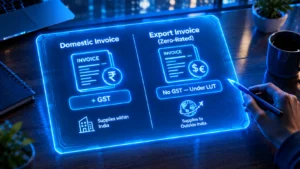
Under GST law, supplying goods or services to a client outside India counts as an export, and exports are treated as zero-rated supply under Section 16 of the Integrated Goods and Services Tax (IGST) Act. That means you don’t charge GST on the invoice at all — not 0% written as a formality, but genuinely no GST line item.
For a service to actually qualify as an export, four conditions generally need to be true: the supplier is based in India, the recipient is outside India, the place of supply is outside India, and payment is received in convertible foreign exchange. If any of these fail — for example, you’re paid in Indian rupees for work delivered to an Indian entity’s overseas branch — it may not qualify as an export, and normal domestic GST rules can apply instead.
Two Ways to Handle GST on Exports
Because exports are zero-rated, you have two options:
1. File a Letter of Undertaking (LUT) and invoice without charging IGST at all. This is what most regular exporters use, since it keeps your invoice simple and your cash flow untouched.
2. Pay IGST upfront on the export invoice, then apply for a refund afterward. This works, but it ties up your working capital until the refund comes through, which can take weeks.
For most freelancers and small businesses with recurring international clients, filing an LUT is the more practical route.
What an LUT Actually Is
A Letter of Undertaking is a declaration filed on Form GST RFD-11, under Rule 96A of the Central Goods and Services Tax (CGST) Rules. By filing it, you’re promising the tax department that you’ll follow the export rules — including receiving payment in foreign exchange within the required timeframe.
A few practical details that catch people out:
– An LUT is valid for one financial year (April 1 to March 31) — you need to file a fresh one every year, ideally before the year starts, so your first invoice of the new year is already covered.
– For exported services, you must realise (actually receive) payment in convertible foreign exchange within one year of the invoice date. If that window is missed, the zero-rating is reversed — you become liable for the IGST you didn’t charge, plus 18% annual interest, generally within 15 days of the deadline passing.
– If you don’t file an LUT for the new financial year in time, any export invoice raised after April 1 is treated as taxable until the new LUT is in place.
What to Put on a Multi-Currency Export Invoice
Beyond the standard invoice fields, an export invoice needs a few extra details:
– The invoice currency (USD, GBP, EUR, or whichever currency you’re billing in)
– A clear statement that this is an export, typically something like: “Supply meant for export under Letter of Undertaking (LUT) without payment of Integrated Tax”
– Your Goods and Services Tax Identification Number (GSTIN) and the client’s country, since there’s usually no GSTIN to collect from an overseas client
– The exchange rate used, if you’re also showing an equivalent value in Indian rupees for your own records

Example:
Say you’re a freelance designer in Pune, and you invoice a client in Germany for €2,000 worth of work, under a valid LUT.
Your invoice shows €2,000 as the total — no GST is added, since this is a zero-rated export of services. For your own bookkeeping, you’d record the rupee equivalent using the exchange rate on the date you recognise the income, but the client only sees and pays the euro amount.
Compare that to a domestic client in Mumbai for the same ₹1,80,000 worth of work at an 18% GST rate: that invoice would show ₹1,80,000 plus ₹32,400 GST (split into CGST and State Goods and Services Tax (SGST), or shown as one Integrated Goods and Services Tax (IGST) line if the client were in a different Indian state), for a total of ₹2,12,400. The export invoice is genuinely simpler — but only if the LUT paperwork is actually in place.
Why a Multi-Currency Invoice Generator Helps
Manually tracking exchange rates, remembering the correct LUT declaration wording, and keeping currency formatting consistent across invoices gets tedious fast, especially once you have clients in more than one country. A tool built for multi-currency invoicing handles the currency display, keeps your export declaration wording consistent, and reduces the chance of forgetting a required field — though it doesn’t replace filing the LUT itself or tracking your foreign exchange realisation deadlines, which remain your responsibility.
Common Mistakes
1. Charging GST on a genuine export invoice out of habit, when it should be zero-rated under a valid LUT
2. Letting the LUT lapse at the start of a new financial year and invoicing without a fresh one in place
3. Not tracking the one-year deadline to actually receive payment in foreign exchange for a service export
4. Missing the required export declaration line on the invoice
5. Assuming any client outside India automatically qualifies as an export, without checking the place-of-supply conditions
FAQ (Frequently Asked Questions)
Do I have to charge GST when billing an overseas client?
No, if the transaction genuinely qualifies as an export of services and you have a valid LUT filed, the invoice is zero-rated with no GST charged.
What happens if I don’t file an LUT?
You can still export, but you’d need to pay IGST upfront on each invoice and then claim a refund afterward, which takes longer and ties up cash.
How long is an LUT valid?
One financial year at a time. You need to file a new one each year on the GST portal.
What if my overseas client pays me late, past a year from the invoice date?
For service exports, if payment isn’t received within one year of the invoice date, the zero-rating can be reversed, and IGST plus interest may become payable.
Do I need to show the invoice amount in Indian rupees too?
It’s not always mandatory on the client-facing invoice, but for your own tax filing and bookkeeping, converting the amount to rupees at the applicable exchange rate is standard practice.
Final Takeaway
Billing international clients under GST isn’t complicated once you understand the mechanics: exports are zero-rated, an LUT lets you skip charging IGST upfront, and the real work is making sure payment actually arrives in foreign exchange within the required window. Since export and currency rules can be updated, always confirm your specific situation against the current official rules before finalising an international invoice.
This article explains general GST export rules and isn’t personal tax advice. For your specific situation, a GST practitioner or chartered accountant can confirm what applies to you.
Sources & References
– GST Portal (Government of India) — LUT filing and export rules — https://www.gst.gov.in/
– Central Board of Indirect Taxes and Customs (CBIC) — Rule 96A of the CGST Rules, export of services conditions — https://www.cbic.gov.in/
Pingback: Invoicing Mistakes Freelancers Make